
Loading...
7 Locations Serving 57 Counties in PA & NY
New equipment
Remote ManagementFrom John Deere Operations Center™ PRO
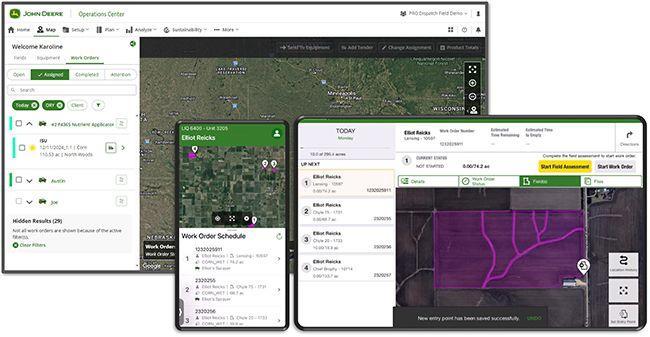
Designed with the ag retailer in mind, John Deere Operations Center™ PRO Dispatch provides an end-to-end fleet dispatching and logistics system. Tools in Operations Center PRO Dispatch like the ability to send work order details directly to an in-cab connected John Deere display, save time so that more acres can be covered all while work gets recorded with the appropriate details as planned.
Manage fleet priorities and logistics to optimize the day with:
Seamless integration with compatible back-office systems to:
Access insights to optimize fleet productivity with machine and work analysis tools
Create a closer connection to farmers with
Ag retailers with multiple locations can manage farm data and assets at the corporate level or at the individual store level within John Deere Operations Center. This provides a scaled system setup for managing large fleets used with PRO Dispatch. Additionally, schedulers, operators, and others may be granted the appropriate access to data needed for their role within the organization. This structure helps to keep the organization running smoothly during the busy season.
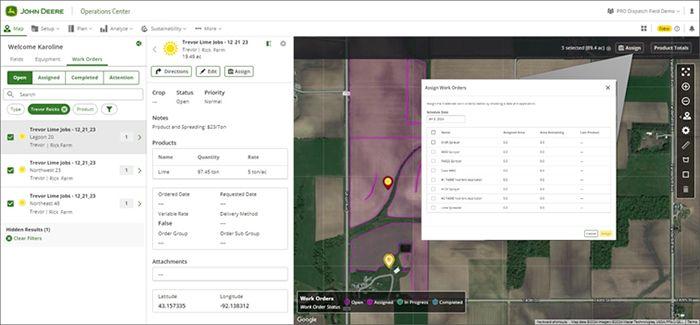
Send work to the complete fleet, regardless of equipment brand
Dispatchers can use the web platform to assign work orders to applicator operators who use the John Deere Operations Center™ PRO Run mobile app. The PRO Run tablet app allows operators to wirelessly receive work orders in the cab, regardless of the equipment brand. Work orders may include attachments such as prescriptions or product labels to help operators complete the job. Once work is completed, the operator can send details about the completed work order in the PRO Dispatch system and can be transferred to other back-office systems.
Save time and reduce recording errors by sending work order details directly to the display
For machines equipped with JDLink and a G5 or Generation 4 display, schedulers can send work order details directly from PRO Dispatch to the display. This saves the operator time when arriving at the field and minimizes the potential for operator error recording work. The scheduler simply needs to assign the work order(s) to the specified equipment in the list and select send to transfer it to the equipment. By sending work directly to the display, the operator no longer must manually transfer the work details from the PRO Run mobile app to the display. It now shows up on the display once the machine pulls up to the field boundary. Once data is recorded in the display, it is sent back to PRO Dispatch and the back office system.
Additional benefits in the PRO Dispatch web application:
NOTE: Multiple tender trucks may be linked to one applicator machine’s schedule but only one applicator machine may be linked to a tender truck at this time.
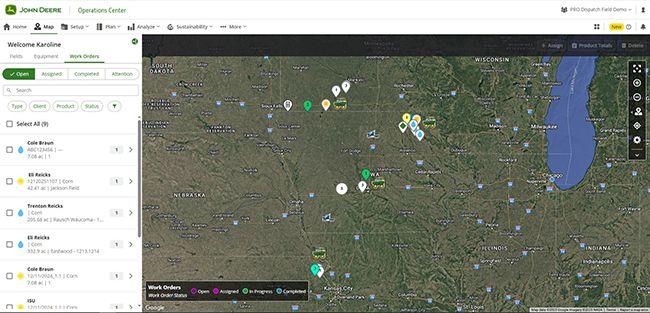
Save time with fewer phone calls between schedulers, operators and tender truck drivers. Schedulers can use the John Deere Operations Center™ PRO Dispatch web application to view the current location of assets. The GPS position is updated in near real time, providing the scheduler with valuable machine and truck location and status.
Improve machine operator and tender truck driver efficiency: