Loading...
7 Locations Serving 57 Counties in PA & NY
New equipment
Field and Water ManagementMobile Weather
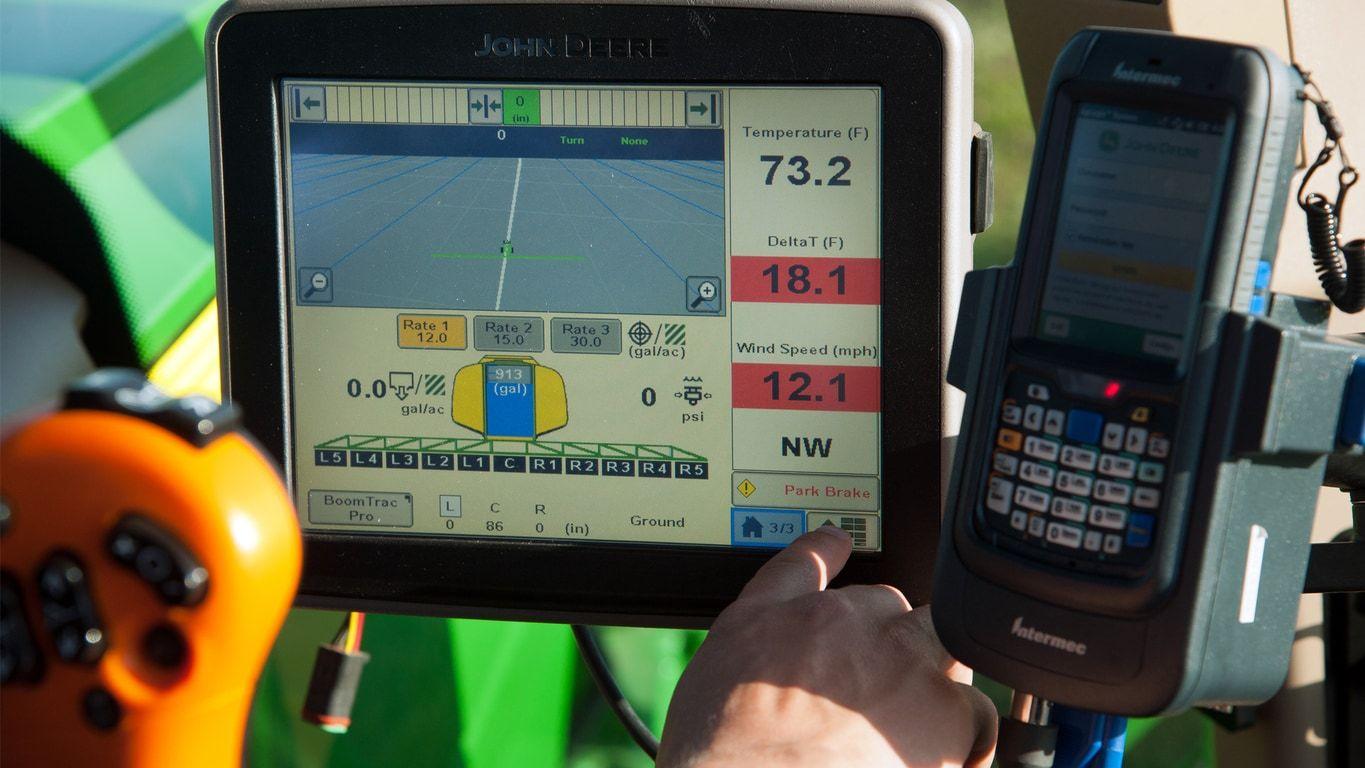
Capture in-field weather information for on-the-go decision making. Accurate information is critical when making decisions surrounding product application, so it is important to use weather information that is specific to the operator and area being covered. John Deere Mobile Weather displays five critical values needed when determining the effectiveness of product application.
True wind speed is wind experienced by a stationary object. Apparent wind speed is the total wind experienced without compensation for machine speed and direction.
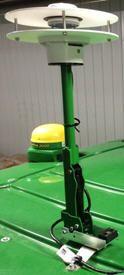
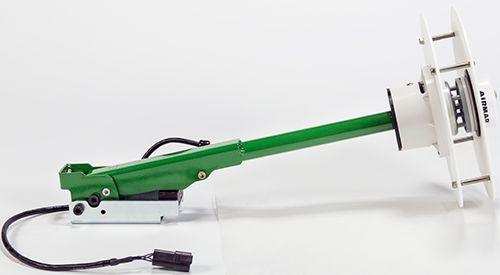
John Deere Mobile Weather utilizes a third-party weather sensor that connects to the John Deere Application Controller. Weather data is collected and distributed to the Gen 4 4600 CommandCenter™ Display or 4640 Universal Display for viewing and documentation. A John Deere Mobile Weather activation is required to utilize the Application Controller to monitor weather information and is included with the purchase of the product.
Producers running a Gen 4 4600 CommandCenter Display, 4640 Universal Display, or GreenStar™ 3 2630 Display are capable of documenting weather data; all other compatible GreenStar 2 Displays are only able to display the weather data without the ability to record. Weather information collected on a Gen 4 Premium Display is compatible with the John Deere Operations Center™ application. Once the weather information is collected, it can then be transferred to APEX™ software system or viewed in Operations Center for further analysis and record keeping. Customers can view mapped air temperature, wind speed, and Delta T, while wind direction and humidity can be seen within the summary information.
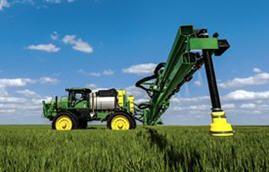

Utilize the customizable alerts and weather information to make educated decisions about when to spray. Monitoring temperature, wind speed, wind direction, Delta T, and relative humidity on the go allows operators to quickly and easily understand if the weather conditions are favorable or not for product application. Built-in alerts make it easy for operators to set operational parameters to know when unfavorable weather conditions are present. Having weather information in the cab allows operators to increase product efficacy and decrease the risk of chemical drift.
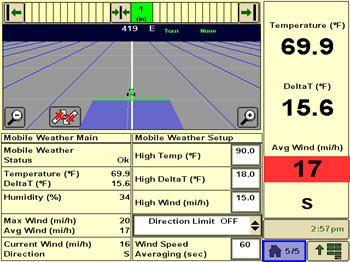
Delta T is a calculation that indicates the acceptable conditions to apply product; the value indicates if the product applied will evaporate prior to being absorbed by the plant. Delta T is a calculated by subtracting the wet bulb temperature from the dry bulb temperature. When applying, Delta T should be between 2⁰C (4⁰F) and 8⁰C (14⁰F), and not greater than 10⁰C (18⁰F). A higher Delta T value results in a faster evaporation rate and shorter droplet lifetime. Applicators can utilize the customizable alerts to notify the operator when Delta T is too high and product application is not favorable in order to ensure maximum product effectiveness.
John Deere Mobile Weather provides system accuracy within +/- 6.4 km/h (+/- 4 mph) up to a 64.3 km/h (40 mph) apparent wind. Apparent wind speed is the total wind experienced without compensation for machine speed and direction. Operating with a headwind and tailwind increases vehicle turbulence, negatively impacting wind speed accuracy. For optimal performance, Mobile Weather is recommended to be utilized in vehicle operation speeds less than 32 km/h (20 mph). John Deere Mobile Weather is not recommended for use in dry-box applications.
NOTE: Specifications are for a new sensor. System performance may vary based upon application.
NOTE: When the wind speed is less than 7.4 km/h (4.6 mph) and/or air temperature is below 0⁰C (32⁰ F), wind, temperature, and relative humidity readings will be less accurate.
NOTE: RMS error is a measure of the differences between values predicted by a model and the values actually observed.
Dimensions, sensor body:
This document lists all the compatible equipment approved with the latest GenOS software and is subject to change with newer software updates. To ensure complete and proper compatibility, the most current version of implement control unit software, G5 or Generation 4 display software, and compatible farm management information software (FMIS) should be used. Non-current software versions will require an update before support can be provided.
Similarly, unapproved software version configurations will not be supported. Please note that the 17-2 software release was the last update that was compatible with 4600 CommandCenter™ displays with v1 processors. All software released after 17-2 are not compatible with 4600 CommandCenter display with v1 processors, these updates are compatible with like displays with v2 processors.
Server serial numbers are as follows:
John Deere Large Ag Tractors
John Deere Large Ag Tractors
(list of all automatically detected machines)
Model year
CommandCenter
Universal Display
4600 v2
4200
G5
G5Plus
4640
4240
G5
G5Plus
9R/9RT/9RX Series
2024 and newer
X
---
---
X
X
X
X
X
9R/9RT/9RX Series
2018-2021
X
---
---
---
X
X
X
X
9R/9RT/9RX Series
2015-2017
*
---
---
---
X
X
X
X
9R/9RT Series
2012-2014
---
---
---
---
X
X
X
X
9030/9030T Series
2008 and newer
---
---
---
---
X
X
X
X
9020/9020T Series
2002-2007
---
---
---
---
X
---
X
X
9000 Series
1997-2001
---
---
---
---
X
---
X
X
9000T Series
2000-2001
---
---
---
---
X
---
X
X
8R/8RT/8RX Series
2024 and newer
X
---
---
X
X
X
X
X
8R/8RT Series
2018-2020
X
---
---
---
X
X
X
X
8R/8RT Series
Mid-2014 - 2017
*
---
---
---
X
X
X
X
8R/8RT Series
2010-2013
---
---
---
---
X
X
X
X
8030/8030T Series
2006 and newer
---
---
---
---
X
X
X
X
8020/8020T Series
2002-2005
---
---
---
---
X
---
X
X
8010/8010T Series
2000-2002
---
---
---
---
X
---
X
X
8000 Series
1994-1999
---
---
---
---
X
---
X
X
8000T Series
1997-1999
---
---
---
---
X
---
X
X
7R Series
2024 and newer
X
X
X
X
X
X
X
X
7R Series
2018-2023
X
X
---
---
X
X
X
X
7R Series
2014-2017
*
---
---
---
X
X
X
X
7R Series
2011-2013
---
---
---
---
X
X
X
X
7J Series
2018 and newer
---
---
---
---
X
X
X
X
7M Brazil
2024 and newer
---
---
---
---
X
X
X
X
7030 Series
2007 and newer
---
---
---
---
X
X
X
X
7030 Series (Large Frame)
2007 and newer
---
---
---
---
X
X
X
X
7030 Series (Small Frame)
2006 and newer
---
---
---
---
X
X
X
X
7020 Series
2003-2007
---
---
---
---
X
X
X
X
6030 Series (Small Frame)
2006 and newer
---
---
---
---
X
X
X
X
6R Series
2024 and newer
---
---
X
X
---
---
X
X
6R Series
2018-2023
X
X
---
---
X
X
X
X
6R Series (Final Tier 4)
2015-2017
*
---
---
---
X
X
X
X
6R Series (Interim Tier 4)
2013-2015
---
---
---
---
X
X
X
X
6M Series
2013 and newer
---
---
---
---
X
X
X
X
6J Series
2018 and newer
---
---
---
---
X
X
X
X
5R Series
2019 and newer
---
---
---
---
X
X
X
X
*NOTE: For latest Precision Ag functionality, update machines equipped from the factory with v1 processor to v2.
John Deere Nutrient Applicators
John Deere Nutrient Applicators
Model year
CommandCenter
Universal Display
4600 v2
4200
G5
G5Plus
4640
4240
G5
G5Plus
F4365 High-Capacity Nutrient Applicator
2017 and newer
X
---
---
---
---
---
---
---
John Deere Self-Propelled Sprayers
John Deere self-
propelled sprayers
Model year
CommandCenter
Universal Display
4600 v2
4200
G5
G5Plus
4640
4240
G5
G5Plus
400 and 600 Series Sprayers/4023
2022 and newer
X
---
---
---
---
---
---
---
4 Series Sprayers
2018 - 2021
X
---
---
---
---
---
---
---
4 Series Sprayers
2013 - 2017
---
---
---
---
X**
---
---
X**
4940
2012 - 2014
---
---
---
---
X**
---
---
X**
4630
2008 and newer
---
---
---
---
X**
---
---
X**
4730
2008 and newer
---
---
---
---
X**
---
---
X**
4830
2008 - 2014
---
---
---
---
X**
---
---
X**
4930
2008 - 2013 (serial number 4000+)
---
---
---
---
X**
---
---
X**
4720, 4920
2004-2007
---
---
---
---
X**
---
---
X**
Hagie™ sprayers
2014 and newer
Compatible with GreenStar™ 3 2630 Displays and 4640 Universal Displays*
*NOTE: When using the 4640 Universal Display on a Hagie Sprayer, additional mounting and harnessing may be required.
NOTE: Current John Deere/Hagie field kits only offer GreenStar 3 2630 Display parts.
NOTE: Multi-rank section control are not supported on Hagie at this time.
NOTE: VIN detection on Hagie Sprayers is only supported on model year 2019 and newer machines.
NOTE: 22-2 and newer software allows the Gen 4 4640 Universal Display to control the Hagie/Montag Fortifier configuration.
**NOTE: The 4640 Universal Display will replace the GreenStar 3 2630 Display on the armrest. Dual display with the GreenStar 3 2630 Display is not supported with sprayers. The 4640 Universal Display does not use the external display navigation buttons located on the armrest, so these buttons are disabled in this configuration.
John Deere Self-Propelled Forage Harvesters (SPFH)
John Deere SPFH
Model year
CommandCenter
Universal Display
4600 v2
4200
G5
G5Plus
4640
4240
G5
G5Plus
9000 Series SPFH
2019 and newer
---
---
---
---
X
---
---
X
8000 Series SPFH
2015 and newer
---
---
---
---
X
---
---
X
NOTE: When adding the 4640 Universal Display to a John Deere SPFH, it will only be compatible as a precision ag display and is installed on the side rail.
John Deere Combines
John Deere Combines
Model year
CommandCenter
Universal Display
4600 v2
4200
G5
G5Plus
4640
4240
G5
G5Plus
X9 Series
2024 and newer
---
---
---
X
---
---
---
---
X9 Series
2021-2023
X
---
---
---
---
---
---
---
S700 Series
2024 and newer
---
---
---
X
---
---
---
---
S700 Series
2018-2023
X
---
---
---
---
---
---
---
S430 and S440
2024 and newer
---
---
X
---
---
---
---
---
S430 and S440
2017-2023
X
---
---
---
---
---
---
---
S600 Series
2012 - 2017
---
---
---
---
X*
X*
X*
X*
S540 and S550 Series
2024 and newer
---
---
---
---
---
---
---
X*
S540 and S550 Series
2012-2023
---
---
---
---
X*
X*
X*
X*
T-Series
2012 and current
---
---
---
---
X*
X*
X*
X*
70 Series
2008 - 2013
---
---
---
---
X*
X*
X*
X*
60 Series
2004 - 2007
---
---
---
---
X*
---
---
X*
50 Series
2000 - 2003
---
---
---
---
X*
---
---
X*
NOTE: Competitive equipment may be compatible with 4640 Universal Display and 4240 Universal Display.
*NOTE: When adding the 4640 Universal Display to a John Deere combine, it will only be compatible as a cornerpost precision ag display.
NOTE: RowSense™ sensor voltage readings and sensor offsets are displayed on Original GreenStar Monitor emulator on 50, 60, and 70 Series Combines.
John Deere Cotton Harvesters
John Deere
Cotton Harvesters
Model year
CommandCenter
Universal Display
4600 v2
4200
G5
G5Plus
4640
4240
G5
G5Plus
CP770
2024 and newer
---
---
---
X
---
---
---
---
CP770
2022-2023
X
---
---
---
---
---
---
---
CS770
2024 and newer
---
---
---
X
---
---
---
---
CS770
2022-2023
X
---
---
---
---
---
---
---
CP690
2015 and newer
---
---
---
---
X
---
---
X
CS690
2015 and newer
---
---
---
---
X
---
---
X
NOTE: Update cab controller software to the latest version on model year 2017 and newer cotton harvesters to use Harvest Identification, Cotton Pro.
NOTE: When adding the 4640 Universal Display to a John Deere Cotton Harvester, it will only be compatible as a cornerpost precision ag display.
John Deere Self-Propelled Windrowers
John Deere Self-Propelled
Windrowers
Model year
CommandCenter
Universal Display
4600 v2
4200
G5
G5Plus
4640
4240
G5
G5Plus
W235
2014 and newer
---
---
---
---
X
X
X
X
W260
2015 and newer
---
---
---
---
X
X
X
X
W110 to W170*
---
---
X
X
X
X
NOTE: When adding the 4640 Universal Display to a John Deere self-propelled windrower, it will only be compatible as a cornerpost precision ag display.
*NOTE: For 22-2, a virtual windrower option is available to support W110 to W170 Self-Propelled Windrowers. VIN detection is not available on these machines.
NOTE: 24-1 Gen OS Software introduces AutoPath compatibility to the following windrower models: W235 and W260 MY14 and newer machines. model year 2022 and newer machines.
John Deere Gators
Model year
CommandCenter Display
Universal Display
4600 v2
4200
G5
G5Plus
4640
4240
G5
G5Plus
XUV 845M HVAC
2025 and newer
---
---
---
---
X
---
X
---
XUV 845R
2025 and newer
---
---
---
---
X
---
X
---
XUV 845R Signature Edition
2025 and newer
---
---
---
---
X
---
X
---
XUV 875M HVAC
2025 and newer
---
---
---
---
X
---
X
---
XUV 875R
2025 and newer
---
---
---
---
X
---
X
---
XUV 875R Signature Edition
2025 and newer
---
---
---
---
X
---
X
---
John Deere planters
SeedStar™ 4HP planters are only compatible with 4600 CommandCenter displays with a version 2 (v2) processor and 4640 Universal Displays. Displays should be running the most current version of tractor applications to be compatible with SeedStar 4HP planter applications. Additionally, dual-display mode is available for use with SeedStar 4HP planter applications, along with Generation 4 Extended Monitor. SeedStar 4HP planters are compatible with no more than two GreenStar Rate Controllers.
The SeedStar 2 configuration below is available only on factory-installed model year 2011 and newer planters and may be field-installed on model year 2009 and 2010 planters. Green PM/PA controllers (factory-installed on model year 2009 and 2010 planters) are not supported with a Generation 4 display.
Service ADVISOR™ is needed to update SeedStar 2, SeedStar XP, and SeedStar 3 HP software. Documentation is not supported when using a rate controller to control row clutches on a John Deere planter.
John Deere planters
Control unit name
Software version (or newer)
CommandCenter
Universal Display
4600 v2
4200
G5
G5Plus
4640
4240*
G5
G5Plus
SeedStar 2
Black PM1
22.0
X
X
X
X
X
X
X
X
Black PA1, (if available PA 2)
22.0
X
X
X
X
X
X
X
X
Green PM1
10.11
---
---
---
---
---
---
---
---
Green PA1 (if available PA 2)
10.11
---
---
---
---
---
---
---
---
SeedStar XP
Black PM1
22.0
X
X
X
X
X
X
X
X
Black PA1, (if available PA 2)
22.0
X
X
X
X
X
X
X
X
PM2
7.0
X
X
X
X
X
X
X
X
SeedStar 3 HP
Planter Main A (PCMA)
6.0
X
X
X
X
X
X
X
X
Planter Main B (PCMB or MMC)
8.0
X
X
X
X
X
X
X
X
Row-unit Controller (RUC)
2.0
X
X
X
X
X
X
X
X
EPG
3.0
X
X
X
X
X
X
X
X
SeedStar 4HP
Planter Apps
10.4.332-12
X
---
X
X
X
---
X
X
Planter Main A (PMCA)
6.0
X
---
X
X
X
---
X
X
Planter Main B (PMCB or MMC)
10.0
X
---
X
X
X
---
X
X
Row-unit Controller (RUC)
4.0
X
---
X
X
X
---
X
X
Electrical Power Generation (EPG)
5.0
X
---
X
X
X
---
X
X
Electrical Power Module, 2 (PC2)
4.0
X
---
X
X
X
---
X
X
ExactRate™ liquid fertilizer system
Master Nozzle Control Unit (MNC)
2.0
X
---
X
X
X
---
X
X
Spray Rate Control Unit (SRC)
2.0
X
---
X
X
X
---
X
X
Liquid Blockage Controller (LBC)
2.0
X
---
X
X
X
---
X
X
Nozzle Control Unit (NZC)
6.04
X
---
X
X
---
X
X
ExactRate app
10.1.269-64
X
---
X
X
---
X
X
*NOTE: For implements requiring ground speed input (radar), utilizing a 4240 Universal Display may require an additional 4240 radar speed kit.
John Deere Air Seeders
The C650 and C850 Air Carts and N500C Seeder are not supported with a GreenStar 3 2630 Display. Additionally, tow-behind C850 Air Carts are compatible with (passive) AutoTrac™ Implement Guidance (ATIG) with software update 18-2 and newer, and hydraulically-driven tow-between air carts are compatible with ATIG and AutoTrac Turn Automation with software update 24-2 and newer.
John Deere Air Seeder
Model year/control unit name
Software version (or newer)
CommandCenter
Universal Display
4600 v2
4200
G5
G5Plus
4640
4240*
G5
G5Plus
C650/850 Air Cart
Cart Master Controller (CMC)
3.0
X
X
X
X
X
X
X
X
Mini Tank Controller (TCX)
2.0
X
X
X
X
X
X
X
X
Front, Middle, Rear Tank Controller (TCU)
2.0
X
X
X
X
X
X
X
X
1870 Seeding Tool - TruSet™ system
2017 and newer (IDC)
5.0
X
X
X
X
X
X
X
X
1870 Seeding Tool - RelativeFlow™ blockage sensors
2017 and newer (BMU)
6.0
X
X
X
X
X
X
X
X
1910 Air Cart - ground drive
2009 and newer
3.0
X
X
X
X
X
X
X
X
1910 Air Cart - hydraulic drive
2013 and newer
11.0
X
X
X
X
X
X
X
X
Seeding tools with air-run blockage - primary blockage
2009 and newer (BMU)
12.0
X
X
X
X
X
X
X
X
Seeding tools with air-run blockage - air-run blockage
2009 and newer (BMU)
12.0
X
X
X
X
X
X
X
X
Member Module
5.0
X
X
X
X
X
X
X
X
1990 Central Commodity System (CCS™)
2009 and newer (BMU)
12.0
X
X
X
X
X
X
X
X
N500C Series
Seeder apps
10.2.19-13
X
---
X
X
X
---
X
X
SMCA or SMC
4.0
X
---
X
X
X
---
X
X
SMCB or BMU
3.0
X
---
X
X
X
---
X
X
EPG
3.0
X
---
X
X
X
---
X
X
*NOTE: For implements requiring ground speed input (radar), utilizing a 4240 Universal Display may require an additional 4240 radar speed kit.
John Deere Tillage
John Deere Tillage
Control unit name
Software version (or newer)
CommandCenter
Universal Display
4600 v2
4200
G5
G5Plus
4640
4240
G5
G5Plus
AccuDepth™ cultivator
Implement Depth Control (IDC)
11
X
X
X
X
X
X
X
X
2730 with TruSet
Tillage Controller 1 (TC1)
2.66K9
X
X
X
X
X
X
X
X
2230 with TruSet
Tillage Controller 1 (TC1)
2.75K6
X
X
X
X
X
X
X
X
2330 with TruSet
Tillage Controller 1 (TC1)
2.35K6
X
X
X
X
X
X
X
X
2620/2630 with TruSet
Tillage Controller 1 (TC1)
2.95K6
X
X
X
X
X
X
X
X
2720 with TruSet
Tillage Controller 1 (TC1)
2.24K6
X
X
X
X
X
X
X
X
2660VT with TruSet
Tillage Controller 1 (TC1)
3.03K12
X
X
X
X
X
X
X
X
2430 with TruSet
Tillage Controller 1 (TC1)
2.14K4
X
X
X
X
X
X
X
X
2510H with TruSet
Tillage Controller 1 (TC1)
2.85K5
X
X
X
X
X
X
X
X
*NOTE: For implements requiring ground speed input (radar), utilizing a 4240 Universal Display may require an additional 4240 radar speed kit.
John Deere Round Balers
John Deere Round Balers
Control unit name
Software version (or newer)
CommandCenter
Universal Display
4600 v2
4200
G5
G5Plus
4640
4240
G5
G5Plus
0 Series
Baler Automation
10.07
X
X
X
X
X
X
X
X
9 Series Premium
Baler Automation
7.16
X
X
X
X
X
X
X
X
V451R/V461R
Baler Automation
11.5
X
X
X
X
X
X
X
X
John Deere Large Square Balers
John Deere Large Square Balers
Including Harvest Tec applicator and PhiBer accumulator
Control unit name
Software version (or newer)
CommandCenter
Universal Display
4600 v2
4200
G5
G5Plus
4640
4240
G5
G5Plus
0 Series
Gen 4 VT
3.04
X
X
X
X
X
X
X
X
1 Series
Gen 4 VT
5.07
X
X
X
X
X
X
X
X
John Deere control units
Control unit name
Software version (or newer)
CommandCenter
Universal Display
4600 v2
4200
G5
G5Plus
4640
4240
G5
G5Plus
*StarFire™ 6000 Receiver
---
4.50P
X
X
X
X
X
X
X
X
StarFire 6000 Integrated Receiver
---
4.50P
X
X
X
X
X
X
X
X
StarFire 3000 Receiver
---
2.80S
X
X
X
X
X
X
X
X
*Modular Telematics Gateways (MTG) - 3G
---
21.03
X
X
X
X
X
X
X
X
*MTG - 4G
---
27.01.541
X
X
X
X
X
X
X
X
Rate Controller 3
X
X
X
X
X
X
GreenStar Rate Controller
---
3.70K
X
X
X
X
X
X
X
X
GreenStar Rate Controller Dry
---
2.11A
X
X
X
X
X
X
X
X
*John Deere Rate Controller 2000
---
1.13A
X
X
X
X
X
X
X
X
*AutoTrac™ Universal 200
---
2.30A
---
---
---
---
X
X
X
X
*AutoTrac Universal 300
---
3.24L
---
---
---
---
X
X
X
X
AutoTrac Controller 300
---
3.24L
---
---
---
---
X
X
X
X
AutoTrac Controller 250
---
11933B
---
---
---
---
X
X
X
X
*AutoTrac Controller - Deere
---
1.11B
---
---
---
---
X
X
X
X
AutoTrac Controller - Raven
---
10.13.909-158
---
---
---
---
X
X
X
X
AutoTrac Controller - Reichhardt®
---
SW 1.3
---
---
---
---
X
X
X
X
AutoTrac RowSense
RG3
AKK15783H
X
---
X
X
X
---
X
X
AutoTrac Vision
VGC
4.01V
X
---
X
X
X
---
X
X
AutoPath™
---
20-3
X
---
X
X
X
---
X
X
AutoTrac Turn Automation
---
19-3
X
---
X
X
X
---
X
X
AutoTrac Implement Guidance (Passive)
---
19-3
X
---
X
X
X
---
X
X
Machine Sync
---
20-3
X
---
X
X
X
---
X
X
In-Field Data Sharing
---
20-3
X
---
X
X
X
---
X
X
Implement Guidance (Active)
UCC2 Application Controller
2.71Z
X
X
X
X
X
X
X
X
UCC2 Application Controller (serial number PCXL01C201000-)
3.20A
X
X
X
X
X
X
X
X
Idle Reasons
---
24-1
X
---
X
X
X
---
X
X
iGrade™
UCC2 Application Controller
2.71Z
X
X
X
X
X
X
X
X
UCC2 Application Controller (serial number PCXL01C201000-)
3.20A
X
X
X
X
X
X
X
X
Distance Trip
UCC2 Application Controller
2.71Z
X*
X
X
X
X
X
X
X
UCC2 Application Controller (serial number PCXL01C201000-)
3.20A
X*
X
X
X
X
X
X
X
Yield Documentation, Specialty Crop
UCC2 Application Controller
1.51Y
X
X
X
X
X
X
X
X
UCC2 Application Controller (serial number PCXL02C201000-)
3.20A
X
X
X
X
X
X
X
X
Mobile Weather
UCC2 Application Controller
1.51Y
X
X*
X
X
X
X*
X
X
UCC2 Application Controller (serial number PCXL02C201000-)
3.20A
X
X*
X
X
X
X*
X
X
Harvest Identification, Cotton
UCC2 Application Controller
1.51Y
---
---
---
---
X
---
X
X
UCC2 Application Controller (serial number PCXL02C201000-)
3.20A
---
---
---
---
X
---
X
X
Earthmoving Productivity System
UCC2 Application Controller
1.51Y
---
---
---
---
X
---
X
X
UCC2 Application Controller (serial number PCXL02C201000-)
3.20A
---
---
---
---
X
---
X
X
Gen 4 Extended Monitor
X
---
---
---
X
---
X
X
Wireless Data Server
Wireless Data Server
1.591.2 (Planting)
7.564.1
(Application)
2.573.1
(Harvesting)
X
---
X
X
X
---
X
X
Mobile Data Transfer
MyTransfer™ app
3.8.6 (iOS®)
3.8.5 (Android™)
X
X
X
X
X
X
X
X
Connect Mobile app
Connect Mobile app
8.4.0 or newer
X
---
X
X
X
---
X
X
Connect Mobile server
Connect Mobile server
2.3.113-1
X
---
X
X
X
---
X
X
Manure Constituent Sensing
Manure Controller
19.06
X
---
X
X
X
---
X
X
*NOTE: See additional information below.
StarFire Receivers
StarFire Receivers can be updated in the following ways:
John Deere Operations Center™ application
To use RDA on a Generation 4 CommandCenter Display with a GreenStar 3 2630 Display connected in the same machine, GreenStar 3 2630 software version 3.22.1095 (SU2014-1) or higher is required (for 4600 CommandCenter Display and 4640 Universal Display only).
GreenStar Rate Controller Dry
GreenStar Rate Controller Dry (GDC) 2.11A was the last software version available through Software Manager. GDC 2.20A has been available since spring 2015 and contains diagnostic language updates. This software can only be obtained through Service ADVISOR.
John Deere Rate Controller 2000
The John Deere Rate Controller 2000 will not control the planter clutches or half-, third-, or quarter-width disconnects on a John Deere planter.
AutoTrac Vision
AutoTrac Vision Guidance is only compatible with Generation 4 18-1 software 10.10.404-345 or newer.
ISOBUS implements
Generation 4 and G5 displays support two Agricultural Industry Electronics Foundation (AEF) certified ISOBUS control units. The use of two ISOBUS control units is limited to the configuration of one front and one rear implement. The use of multiple ISOBUS control units as rear implements is not supported. Generation 4 displays support AEF-certified ISOBUS implements with Task Controller Section Control (TC-SC) functionality and AEF certification for TC-SC include sprayers, fertilizer spreaders, planters, seeders, manure applicators, etc. For third-party FMIS compatibility, reference the John Deere Operations Center.
A software update performed by an authorized ISOBUS implement dealer may be required to obtain compatible software. ISOBUS implements must be certified through the Agricultural Industry Electronics Foundation (AEF) to be recognized by the Generation 4 CommandCenter Display. Visit www.aef-online.org for more information; visit www.aef-isobus-database.org for an active list of compatible implements.
ISOBUS implements with VT4 are now supported by G5 and Generation 4 displays. Generation 4 displays still support older VT versions (example: VT2 and VT3). If an implement is not loading after updating to Generation 4 software update 2017-2 (or newer on 4600 CommandCenter v2 processors), it is recommended that the implement manufacturer be contacted to get a software version that is either VT3 or VT4.
Implements without controllers
Implements without controllers can be documented as a stand-alone operation or with a rate controller from John Deere. Additionally, multiple implements without controllers cannot be documented together.
AutoPath
AutoPath is compatible with G5 displays, Gen 4 4600 CommandCenter (v2 server) and 4640 Universal Displays. AutoPath (rows) (20-3 and later software) requires specific row data documentation (that is gathered during the first field operation of the year), using an implement mounted StarFire Receiver equipped with SF3 or higher correction signal. Shared signal is compatible.
For more information on AutoPath functionality and requirements, please refer to the AutoPath Sales Manual.
AutoTrac Implement Guidance (Passive)
Important Notes:
AutoTrac Turn Automation
AutoTrac Turn Automation is compatible with the following machines:
NOTE: Integrated tractor IMS must be turned off on 30 Series Tractors to use AutoTrac Turn Automation on the G5 or Gen 4 display. Integrated Tractor iTEC must be turned off on the following tractors to use AutoTrac Turn Automation on the G5 or Gen 4:
NOTE: If instead an operator chooses to use the machine’s integrated IMS/iTEC functionality, then AutoTrac Turn Automation and iTEC must be turned off in the Gen 4 or G5 Display.
AutoTrac Turn Automation is compatible with the following implements:
AutoTrac Turn Automation is NOT compatible with the following implements and implement configurations:
For more information on AutoTrac Turn Automation functionality and requirements, please refer to the Sales Manual.
Machine Sync
All machines (leaders and followers) running Machine Sync must be equipped with High Connectivity Machine Sync antennas. This will yield the best performance and connection between the two machines when unloading harvested crops on the go.
Part # BPF12656 : High-connectivity antenna kit for Machine Sync technology utilization via a Gen 4 or G5 display. This antenna kit is compatible with the following machines:
Supported leader platforms
Supported follower platforms
NOTE:
Machine Sync is supported on G5/G5Plus Universal or CommandCenter Displays, Gen 4 4600 CommandCenter Displays, and Gen 4 4640 Universal Displays. G5 and Gen 4 configurations will work with one another. I.E., an X9 Combine is equipped with a G5 Plus Display, and its grain cart tractor is equipped with a Gen 4 display will work together in a Machine Sync setting.
We recommend the leader has a higher or equal correction signal to the follower. Starting May of 2024, StarFire 3000 Receiver software updates and fixes will no longer be available, therefore, this receiver will no longer be compatible with Machine Sync. The configuration will not be blocked; however, support will be discontinued in the event an issue arises.
Idle Reasons
Idle Reasons is available with the following activations/subscriptions: Premium 3.0, Automation 4.0 or G5 Advanced with 24-1 or later software.
Reprogramming UCC2 Application Controllers
4600 CommandCenter v1 does not support reprogramming on the UCC2 version of Application Controller. Service ADVISOR or compatible displays may be used.
Distance Trip documentation/Yield Documentation, Specialty Crop
A UCC2 Application Controller with 19-2 software or newer, running on a 4600 CommandCenter v2 server enables documentation of field operations. If a UCC2 replaces a UCC1 Application Controller on a CommandCenter v1 server, documentation is not available.
Camera compatibility
Voyager® cameras are supported on Generation 4 displays. All other camera types are not supported.
Non-John Deere Precision Ag
4600 CommandCenter v2 and the 4640 Universal Display are compatible with the following RS-232 configurations with software update 18-2 and newer:
4600 CommandCenter v2 and the 4640 Universal Display are compatible with the following RS-232 configurations with software update 20-3 and newer:
Machine Communication Radio (MCR)
Generation 4 displays are not compatible with MCR.
NOTE: Gen 4 data is only compatible with the John Deere Operations Center. All Gen 4 activations are machine specific and cannot be transferred to a different machine. If not using WDT, an 8- to 32-GB USB is required to transfer data to and from the Gen 4 display. Implement settings are display specific and cannot be imported or exported from the Gen 4 display.
RAM is a trademark of National Products Inc. Montag is a trademark of Montag Manufacturing, Inc. Hagie is a trademark of Hagie Manufacturing Company and similar to John Deere branded equipment, John Deere will support Hagie equipment. Reichhardt is a trademark of Reichhardt GmbH Steuerungstechnik. iOS is a trademark of Cisco Technology, Inc. used under license by Apple Inc. Android is a trademark of Google LLC. Voyager is a trademark of ASA Electronics, LLC. Trimble and GreenSeeker are trademarks of Trimble, Inc.