Loading...
7 Locations Serving 57 Counties in PA & NY
New equipment
Data ManagementHarvestLab™ and Constituent Sensing
The HarvestLab™ 3000 sensor can be used for three different applications:
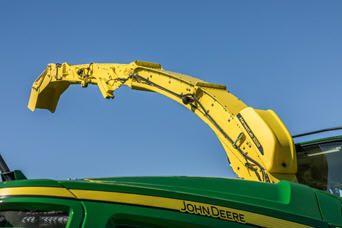
The HarvestLab 3000 sensor enables an accurate measurement and documentation of dry matter, starch, protein, neutral detergent fiber, and acid detergent fiber in different crop types. For better fertilization planning in the next season, operators can use the HarvestLab 3000 sensor to determine and document the nutrient values taken off the field during harvest. It also helps achieve higher quality forage by enabling automatic length-of-cut adjustments on the go to ensure an optimal bunker compaction and conservation. In addition, the smart use of additives ultimately leads to higher milk yields and more efficient use of feed.
The HarvestLab 3000 sensor and stationary kit can provide time and cost savings with use in the barn, field office, or anywhere feed analysis is needed. For example, the components of a total mix ratio (TMR) can be measured every day to ensure the correct mix ration and achieve the maximum milk yield.
Measured data can also be downloaded from the HarvestLab 3000 sensor and saved to a computer for record-keeping purposes or to share with a nutritionist.
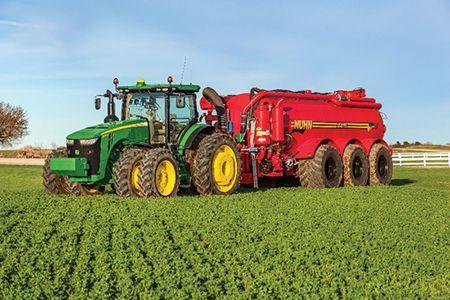
The HarvestLab 3000 sensor allows precise application of liquid organic fertilizer based on target and limit rate. This eliminates over fertilization (causing laid crops) and under fertilization (causing low yields). The system allows calculation of precise prescription maps to fill nutrient levels to the desired target, meaning the producer pays for quality not for quantity. Additionally, it helps to properly determine and document the applied nutrient levels to comply with legal regulations and cross compliance.
Further information can be found in the John Deere Manure Sensing Sales Manual.
Developed and patented with Carl-Zeiss, the HarvestLab™ 3000 sensor simultaneously measures the dry matter and various constituents of harvested crops. The HarvestLab 3000 uses the same near-infrared-reflectance (NIR) technology entrusted and used by most nutrition labs, but produces results instantly and with over 4000 readings per second. This provides producers with not simply one random sample value but statistically solid data on the go.
HarvestLab™ 3000 sensor provides on-the-go yield, moisture and constituents data when used in conjunction with the Harvest Monitor™ system. This instantaneous information can then be recorded and documented by using the Harvest Doc™ mapping system and a StarFire™ 6000 Receiver.
Each operation is unique, but in general, silage harvested in a matter of days is expected to feed herds the entire year or be sold throughout the year.
Considering harvest conditions are never perfect and feed quality never improves after harvest or during storage, effective management and the ability to react quickly and efficiently becomes paramount.
The HarvestLab 3000 sensor allows producers to make informed management decisions at harvest and during storage in order to maximize silage and feed quality from the day it is harvested to the day it is fed or sold.
Much value stems from obtaining instantaneous yield, moisture, and constituent data. Producers can do the following:
HarvestLab 3000
HarvestLab 3000 + John Deere Constituent Sensing forage bundle
(corn and silage)
fresh and ensiled
HarvestLab 3000 + John Deere Constituent Sensing forage bundle
(haylage)
fresh and ensiled
HarvestLab 3000 + John Deere Constituent Sensing manure bundle
(pig, cattle, biogas)
Dry matter (DM)
Dry matter (DM)
Dry matter (DM)
Dry matter (DM)
Moisture
Moisture
Moisture
Nitrogen (Ntot)
Crude protein
Crude protein
Ammonium (NH4)
Crude starch
Neutral detergent fiber (NDF)
Phosphorus (P205)
Neutral detergent fiber (NDF)
Acid detergent fiber (ADF)
Potassium (K2O)
Acid detergent fiber (ADF)
Crude ash
Volume
Crude ash
Crude sugar
Crude sugar
For further information regarding the constituents, see John Deere Constituent Sensing in the Sales Manual.
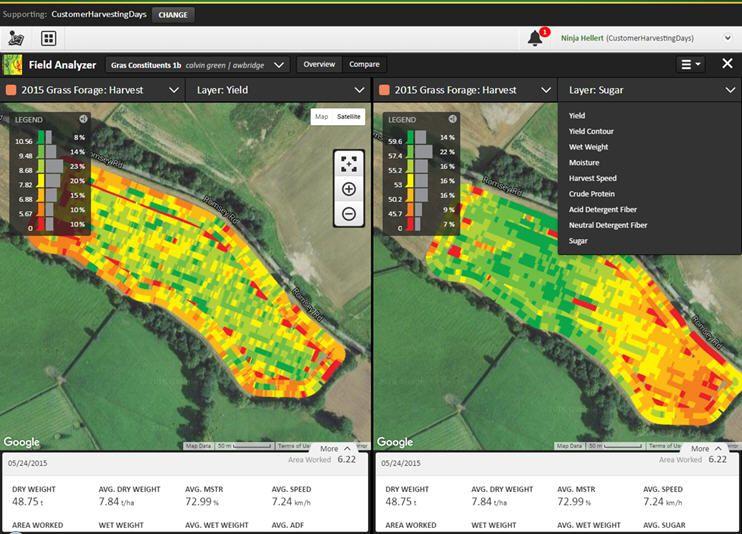
Data recorded with the HarvestLab™ 3000 sensor on the forage harvester or a manure tanker can be sent wirelessly to the John Deere Operations Center web and mobile. Data is available to view in Field Analyzer after a field has been completed and new work has started, or approximately one-half hour after field work has been stopped. Producers can analyze data from completed fields or view where field work is in process, making it easier for them to make operational decisions. Data is available for analysis from any internet-connected device to make important production decisions and gives operations the ability to invoice work recently completed.
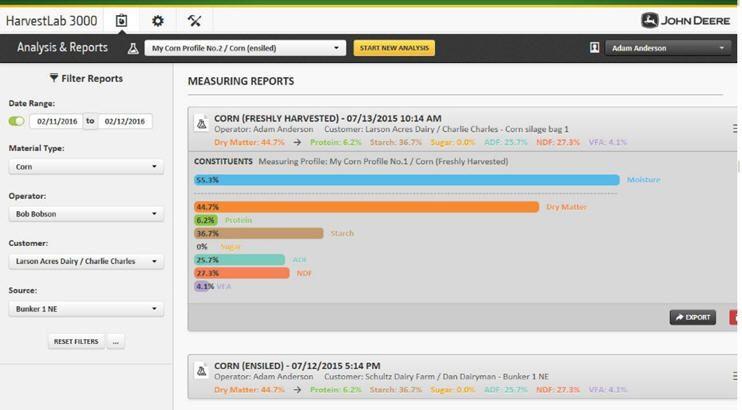
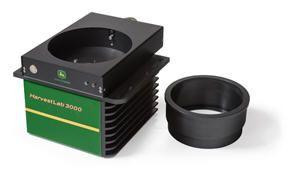
Easily connect the HarvestLab 3000 sensor with the HarvestLab 3000 stationary kit. The sensor can be removed from a forage harvester or manure tanker in a matter of minutes. The stationary kit offers a practical and easy-to-use solution to measure forage quality away from the John Deere self-propelled forage harvester.
Operate the stationary application using the intuitive web-user interface, including improved measurements procedure with detailed step-by-step explanations. Store measurements or export them in the CSV format.
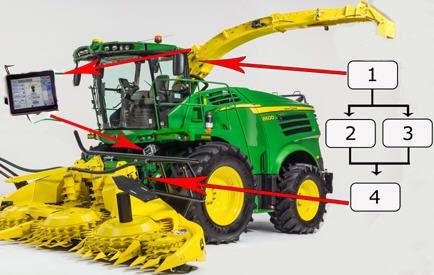
Save up to 5 percent fuel while increasing throughput leveraging AutoLoc.
AutoLoc, a feature exclusive to John Deere, brings added value to the HarvestLab moisture sensor and John Deere self-propelled forage harvester (SPFH). AutoLoc works in conjunction with the HarvestLab 3000 sensor and IVLOC to automatically adjust the length of cut based on crop-moisture levels to improve bunk density. Nutritionists, herdsmen, and SPFH operators will all benefit from this innovation.
John Deere is leading the industry in providing real-time information that matters most to forage production. Quality forage comes from properly packed silage, which is directly related to the moisture content and length of cut of the crop.
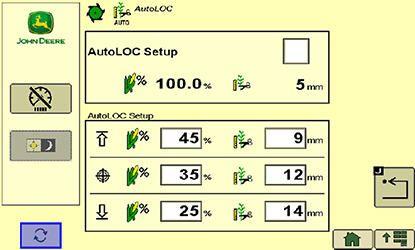
Length-of-cut changes are made automatically in the field based on moisture readings and predetermined settings determined by operator requirements. No in-field calibration is required to load the length-of-cut (LOC) requirements; the operator simply uses the GreenStar™ display to program the desired LOC settings at different moisture levels.
When moisture levels of crop in the field change, the hydrostatic IVLOC feedroll drive automatically responds to either an increase or decrease the feedroll speed, which in turn changes the LOC. If moisture levels of the crop are outside of the desired range, IVLOC adjusts and limits the LOC, based on the maximum and minimum LOC settings, as determined by the operator.
This document lists all the compatible equipment approved with the latest GenOS software and is subject to change with newer software updates. To ensure complete and proper compatibility, the most current version of implement control unit software, G5 or Generation 4 display software, and compatible farm management information software (FMIS) should be used. Non-current software versions will require an update before support can be provided.
Similarly, unapproved software version configurations will not be supported. Please note that the 17-2 software release was the last update that was compatible with 4600 CommandCenter™ displays with v1 processors. All software released after 17-2 are not compatible with 4600 CommandCenter display with v1 processors, these updates are compatible with like displays with v2 processors.
Server serial numbers are as follows:
John Deere Large Ag Tractors
John Deere Large Ag Tractors
(list of all automatically detected machines)
Model year
CommandCenter
Universal Display
4600 v2
4200
G5
G5Plus
4640
4240
G5
G5Plus
9R/9RT/9RX Series
2024 and newer
X
---
---
X
X
X
X
X
9R/9RT/9RX Series
2018-2021
X
---
---
---
X
X
X
X
9R/9RT/9RX Series
2015-2017
*
---
---
---
X
X
X
X
9R/9RT Series
2012-2014
---
---
---
---
X
X
X
X
9030/9030T Series
2008 and newer
---
---
---
---
X
X
X
X
9020/9020T Series
2002-2007
---
---
---
---
X
---
X
X
9000 Series
1997-2001
---
---
---
---
X
---
X
X
9000T Series
2000-2001
---
---
---
---
X
---
X
X
8R/8RT/8RX Series
2024 and newer
X
---
---
X
X
X
X
X
8R/8RT Series
2018-2020
X
---
---
---
X
X
X
X
8R/8RT Series
Mid-2014 - 2017
*
---
---
---
X
X
X
X
8R/8RT Series
2010-2013
---
---
---
---
X
X
X
X
8030/8030T Series
2006 and newer
---
---
---
---
X
X
X
X
8020/8020T Series
2002-2005
---
---
---
---
X
---
X
X
8010/8010T Series
2000-2002
---
---
---
---
X
---
X
X
8000 Series
1994-1999
---
---
---
---
X
---
X
X
8000T Series
1997-1999
---
---
---
---
X
---
X
X
7R Series
2024 and newer
X
X
X
X
X
X
X
X
7R Series
2018-2023
X
X
---
---
X
X
X
X
7R Series
2014-2017
*
---
---
---
X
X
X
X
7R Series
2011-2013
---
---
---
---
X
X
X
X
7J Series
2018 and newer
---
---
---
---
X
X
X
X
7M Brazil
2024 and newer
---
---
---
---
X
X
X
X
7030 Series
2007 and newer
---
---
---
---
X
X
X
X
7030 Series (Large Frame)
2007 and newer
---
---
---
---
X
X
X
X
7030 Series (Small Frame)
2006 and newer
---
---
---
---
X
X
X
X
7020 Series
2003-2007
---
---
---
---
X
X
X
X
6030 Series (Small Frame)
2006 and newer
---
---
---
---
X
X
X
X
6R Series
2024 and newer
---
---
X
X
---
---
X
X
6R Series
2018-2023
X
X
---
---
X
X
X
X
6R Series (Final Tier 4)
2015-2017
*
---
---
---
X
X
X
X
6R Series (Interim Tier 4)
2013-2015
---
---
---
---
X
X
X
X
6M Series
2013 and newer
---
---
---
---
X
X
X
X
6J Series
2018 and newer
---
---
---
---
X
X
X
X
5R Series
2019 and newer
---
---
---
---
X
X
X
X
*NOTE: For latest Precision Ag functionality, update machines equipped from the factory with v1 processor to v2.
John Deere Nutrient Applicators
John Deere Nutrient Applicators
Model year
CommandCenter
Universal Display
4600 v2
4200
G5
G5Plus
4640
4240
G5
G5Plus
F4365 High-Capacity Nutrient Applicator
2017 and newer
X
---
---
---
---
---
---
---
John Deere Self-Propelled Sprayers
John Deere self-
propelled sprayers
Model year
CommandCenter
Universal Display
4600 v2
4200
G5
G5Plus
4640
4240
G5
G5Plus
400 and 600 Series Sprayers/4023
2022 and newer
X
---
---
---
---
---
---
---
4 Series Sprayers
2018 - 2021
X
---
---
---
---
---
---
---
4 Series Sprayers
2013 - 2017
---
---
---
---
X**
---
---
X**
4940
2012 - 2014
---
---
---
---
X**
---
---
X**
4630
2008 and newer
---
---
---
---
X**
---
---
X**
4730
2008 and newer
---
---
---
---
X**
---
---
X**
4830
2008 - 2014
---
---
---
---
X**
---
---
X**
4930
2008 - 2013 (serial number 4000+)
---
---
---
---
X**
---
---
X**
4720, 4920
2004-2007
---
---
---
---
X**
---
---
X**
Hagie™ sprayers
2014 and newer
Compatible with GreenStar™ 3 2630 Displays and 4640 Universal Displays*
*NOTE: When using the 4640 Universal Display on a Hagie Sprayer, additional mounting and harnessing may be required.
NOTE: Current John Deere/Hagie field kits only offer GreenStar 3 2630 Display parts.
NOTE: Multi-rank section control are not supported on Hagie at this time.
NOTE: VIN detection on Hagie Sprayers is only supported on model year 2019 and newer machines.
NOTE: 22-2 and newer software allows the Gen 4 4640 Universal Display to control the Hagie/Montag Fortifier configuration.
**NOTE: The 4640 Universal Display will replace the GreenStar 3 2630 Display on the armrest. Dual display with the GreenStar 3 2630 Display is not supported with sprayers. The 4640 Universal Display does not use the external display navigation buttons located on the armrest, so these buttons are disabled in this configuration.
John Deere Self-Propelled Forage Harvesters (SPFH)
John Deere SPFH
Model year
CommandCenter
Universal Display
4600 v2
4200
G5
G5Plus
4640
4240
G5
G5Plus
9000 Series SPFH
2019 and newer
---
---
---
---
X
---
---
X
8000 Series SPFH
2015 and newer
---
---
---
---
X
---
---
X
NOTE: When adding the 4640 Universal Display to a John Deere SPFH, it will only be compatible as a precision ag display and is installed on the side rail.
John Deere Combines
John Deere Combines
Model year
CommandCenter
Universal Display
4600 v2
4200
G5
G5Plus
4640
4240
G5
G5Plus
X9 Series
2024 and newer
---
---
---
X
---
---
---
---
X9 Series
2021-2023
X
---
---
---
---
---
---
---
S700 Series
2024 and newer
---
---
---
X
---
---
---
---
S700 Series
2018-2023
X
---
---
---
---
---
---
---
S430 and S440
2024 and newer
---
---
X
---
---
---
---
---
S430 and S440
2017-2023
X
---
---
---
---
---
---
---
S600 Series
2012 - 2017
---
---
---
---
X*
X*
X*
X*
S540 and S550 Series
2024 and newer
---
---
---
---
---
---
---
X*
S540 and S550 Series
2012-2023
---
---
---
---
X*
X*
X*
X*
T-Series
2012 and current
---
---
---
---
X*
X*
X*
X*
70 Series
2008 - 2013
---
---
---
---
X*
X*
X*
X*
60 Series
2004 - 2007
---
---
---
---
X*
---
---
X*
50 Series
2000 - 2003
---
---
---
---
X*
---
---
X*
NOTE: Competitive equipment may be compatible with 4640 Universal Display and 4240 Universal Display.
*NOTE: When adding the 4640 Universal Display to a John Deere combine, it will only be compatible as a cornerpost precision ag display.
NOTE: RowSense™ sensor voltage readings and sensor offsets are displayed on Original GreenStar Monitor emulator on 50, 60, and 70 Series Combines.
John Deere Cotton Harvesters
John Deere
Cotton Harvesters
Model year
CommandCenter
Universal Display
4600 v2
4200
G5
G5Plus
4640
4240
G5
G5Plus
CP770
2024 and newer
---
---
---
X
---
---
---
---
CP770
2022-2023
X
---
---
---
---
---
---
---
CS770
2024 and newer
---
---
---
X
---
---
---
---
CS770
2022-2023
X
---
---
---
---
---
---
---
CP690
2015 and newer
---
---
---
---
X
---
---
X
CS690
2015 and newer
---
---
---
---
X
---
---
X
NOTE: Update cab controller software to the latest version on model year 2017 and newer cotton harvesters to use Harvest Identification, Cotton Pro.
NOTE: When adding the 4640 Universal Display to a John Deere Cotton Harvester, it will only be compatible as a cornerpost precision ag display.
John Deere Self-Propelled Windrowers
John Deere Self-Propelled
Windrowers
Model year
CommandCenter
Universal Display
4600 v2
4200
G5
G5Plus
4640
4240
G5
G5Plus
W235
2014 and newer
---
---
---
---
X
X
X
X
W260
2015 and newer
---
---
---
---
X
X
X
X
W110 to W170*
---
---
X
X
X
X
NOTE: When adding the 4640 Universal Display to a John Deere self-propelled windrower, it will only be compatible as a cornerpost precision ag display.
*NOTE: For 22-2, a virtual windrower option is available to support W110 to W170 Self-Propelled Windrowers. VIN detection is not available on these machines.
NOTE: 24-1 Gen OS Software introduces AutoPath compatibility to the following windrower models: W235 and W260 MY14 and newer machines. model year 2022 and newer machines.
John Deere Gators
Model year
CommandCenter Display
Universal Display
4600 v2
4200
G5
G5Plus
4640
4240
G5
G5Plus
XUV 845M HVAC
2025 and newer
---
---
---
---
X
---
X
---
XUV 845R
2025 and newer
---
---
---
---
X
---
X
---
XUV 845R Signature Edition
2025 and newer
---
---
---
---
X
---
X
---
XUV 875M HVAC
2025 and newer
---
---
---
---
X
---
X
---
XUV 875R
2025 and newer
---
---
---
---
X
---
X
---
XUV 875R Signature Edition
2025 and newer
---
---
---
---
X
---
X
---
John Deere planters
SeedStar™ 4HP planters are only compatible with 4600 CommandCenter displays with a version 2 (v2) processor and 4640 Universal Displays. Displays should be running the most current version of tractor applications to be compatible with SeedStar 4HP planter applications. Additionally, dual-display mode is available for use with SeedStar 4HP planter applications, along with Generation 4 Extended Monitor. SeedStar 4HP planters are compatible with no more than two GreenStar Rate Controllers.
The SeedStar 2 configuration below is available only on factory-installed model year 2011 and newer planters and may be field-installed on model year 2009 and 2010 planters. Green PM/PA controllers (factory-installed on model year 2009 and 2010 planters) are not supported with a Generation 4 display.
Service ADVISOR™ is needed to update SeedStar 2, SeedStar XP, and SeedStar 3 HP software. Documentation is not supported when using a rate controller to control row clutches on a John Deere planter.
John Deere planters
Control unit name
Software version (or newer)
CommandCenter
Universal Display
4600 v2
4200
G5
G5Plus
4640
4240*
G5
G5Plus
SeedStar 2
Black PM1
22.0
X
X
X
X
X
X
X
X
Black PA1, (if available PA 2)
22.0
X
X
X
X
X
X
X
X
Green PM1
10.11
---
---
---
---
---
---
---
---
Green PA1 (if available PA 2)
10.11
---
---
---
---
---
---
---
---
SeedStar XP
Black PM1
22.0
X
X
X
X
X
X
X
X
Black PA1, (if available PA 2)
22.0
X
X
X
X
X
X
X
X
PM2
7.0
X
X
X
X
X
X
X
X
SeedStar 3 HP
Planter Main A (PCMA)
6.0
X
X
X
X
X
X
X
X
Planter Main B (PCMB or MMC)
8.0
X
X
X
X
X
X
X
X
Row-unit Controller (RUC)
2.0
X
X
X
X
X
X
X
X
EPG
3.0
X
X
X
X
X
X
X
X
SeedStar 4HP
Planter Apps
10.4.332-12
X
---
X
X
X
---
X
X
Planter Main A (PMCA)
6.0
X
---
X
X
X
---
X
X
Planter Main B (PMCB or MMC)
10.0
X
---
X
X
X
---
X
X
Row-unit Controller (RUC)
4.0
X
---
X
X
X
---
X
X
Electrical Power Generation (EPG)
5.0
X
---
X
X
X
---
X
X
Electrical Power Module, 2 (PC2)
4.0
X
---
X
X
X
---
X
X
ExactRate™ liquid fertilizer system
Master Nozzle Control Unit (MNC)
2.0
X
---
X
X
X
---
X
X
Spray Rate Control Unit (SRC)
2.0
X
---
X
X
X
---
X
X
Liquid Blockage Controller (LBC)
2.0
X
---
X
X
X
---
X
X
Nozzle Control Unit (NZC)
6.04
X
---
X
X
---
X
X
ExactRate app
10.1.269-64
X
---
X
X
---
X
X
*NOTE: For implements requiring ground speed input (radar), utilizing a 4240 Universal Display may require an additional 4240 radar speed kit.
John Deere Air Seeders
The C650 and C850 Air Carts and N500C Seeder are not supported with a GreenStar 3 2630 Display. Additionally, tow-behind C850 Air Carts are compatible with (passive) AutoTrac™ Implement Guidance (ATIG) with software update 18-2 and newer, and hydraulically-driven tow-between air carts are compatible with ATIG and AutoTrac Turn Automation with software update 24-2 and newer.
John Deere Air Seeder
Model year/control unit name
Software version (or newer)
CommandCenter
Universal Display
4600 v2
4200
G5
G5Plus
4640
4240*
G5
G5Plus
C650/850 Air Cart
Cart Master Controller (CMC)
3.0
X
X
X
X
X
X
X
X
Mini Tank Controller (TCX)
2.0
X
X
X
X
X
X
X
X
Front, Middle, Rear Tank Controller (TCU)
2.0
X
X
X
X
X
X
X
X
1870 Seeding Tool - TruSet™ system
2017 and newer (IDC)
5.0
X
X
X
X
X
X
X
X
1870 Seeding Tool - RelativeFlow™ blockage sensors
2017 and newer (BMU)
6.0
X
X
X
X
X
X
X
X
1910 Air Cart - ground drive
2009 and newer
3.0
X
X
X
X
X
X
X
X
1910 Air Cart - hydraulic drive
2013 and newer
11.0
X
X
X
X
X
X
X
X
Seeding tools with air-run blockage - primary blockage
2009 and newer (BMU)
12.0
X
X
X
X
X
X
X
X
Seeding tools with air-run blockage - air-run blockage
2009 and newer (BMU)
12.0
X
X
X
X
X
X
X
X
Member Module
5.0
X
X
X
X
X
X
X
X
1990 Central Commodity System (CCS™)
2009 and newer (BMU)
12.0
X
X
X
X
X
X
X
X
N500C Series
Seeder apps
10.2.19-13
X
---
X
X
X
---
X
X
SMCA or SMC
4.0
X
---
X
X
X
---
X
X
SMCB or BMU
3.0
X
---
X
X
X
---
X
X
EPG
3.0
X
---
X
X
X
---
X
X
*NOTE: For implements requiring ground speed input (radar), utilizing a 4240 Universal Display may require an additional 4240 radar speed kit.
John Deere Tillage
John Deere Tillage
Control unit name
Software version (or newer)
CommandCenter
Universal Display
4600 v2
4200
G5
G5Plus
4640
4240
G5
G5Plus
AccuDepth™ cultivator
Implement Depth Control (IDC)
11
X
X
X
X
X
X
X
X
2730 with TruSet
Tillage Controller 1 (TC1)
2.66K9
X
X
X
X
X
X
X
X
2230 with TruSet
Tillage Controller 1 (TC1)
2.75K6
X
X
X
X
X
X
X
X
2330 with TruSet
Tillage Controller 1 (TC1)
2.35K6
X
X
X
X
X
X
X
X
2620/2630 with TruSet
Tillage Controller 1 (TC1)
2.95K6
X
X
X
X
X
X
X
X
2720 with TruSet
Tillage Controller 1 (TC1)
2.24K6
X
X
X
X
X
X
X
X
2660VT with TruSet
Tillage Controller 1 (TC1)
3.03K12
X
X
X
X
X
X
X
X
2430 with TruSet
Tillage Controller 1 (TC1)
2.14K4
X
X
X
X
X
X
X
X
2510H with TruSet
Tillage Controller 1 (TC1)
2.85K5
X
X
X
X
X
X
X
X
*NOTE: For implements requiring ground speed input (radar), utilizing a 4240 Universal Display may require an additional 4240 radar speed kit.
John Deere Round Balers
John Deere Round Balers
Control unit name
Software version (or newer)
CommandCenter
Universal Display
4600 v2
4200
G5
G5Plus
4640
4240
G5
G5Plus
0 Series
Baler Automation
10.07
X
X
X
X
X
X
X
X
9 Series Premium
Baler Automation
7.16
X
X
X
X
X
X
X
X
V451R/V461R
Baler Automation
11.5
X
X
X
X
X
X
X
X
John Deere Large Square Balers
John Deere Large Square Balers
Including Harvest Tec applicator and PhiBer accumulator
Control unit name
Software version (or newer)
CommandCenter
Universal Display
4600 v2
4200
G5
G5Plus
4640
4240
G5
G5Plus
0 Series
Gen 4 VT
3.04
X
X
X
X
X
X
X
X
1 Series
Gen 4 VT
5.07
X
X
X
X
X
X
X
X
John Deere control units
Control unit name
Software version (or newer)
CommandCenter
Universal Display
4600 v2
4200
G5
G5Plus
4640
4240
G5
G5Plus
*StarFire™ 6000 Receiver
---
4.50P
X
X
X
X
X
X
X
X
StarFire 6000 Integrated Receiver
---
4.50P
X
X
X
X
X
X
X
X
StarFire 3000 Receiver
---
2.80S
X
X
X
X
X
X
X
X
*Modular Telematics Gateways (MTG) - 3G
---
21.03
X
X
X
X
X
X
X
X
*MTG - 4G
---
27.01.541
X
X
X
X
X
X
X
X
Rate Controller 3
X
X
X
X
X
X
GreenStar Rate Controller
---
3.70K
X
X
X
X
X
X
X
X
GreenStar Rate Controller Dry
---
2.11A
X
X
X
X
X
X
X
X
*John Deere Rate Controller 2000
---
1.13A
X
X
X
X
X
X
X
X
*AutoTrac™ Universal 200
---
2.30A
---
---
---
---
X
X
X
X
*AutoTrac Universal 300
---
3.24L
---
---
---
---
X
X
X
X
AutoTrac Controller 300
---
3.24L
---
---
---
---
X
X
X
X
AutoTrac Controller 250
---
11933B
---
---
---
---
X
X
X
X
*AutoTrac Controller - Deere
---
1.11B
---
---
---
---
X
X
X
X
AutoTrac Controller - Raven
---
10.13.909-158
---
---
---
---
X
X
X
X
AutoTrac Controller - Reichhardt®
---
SW 1.3
---
---
---
---
X
X
X
X
AutoTrac RowSense
RG3
AKK15783H
X
---
X
X
X
---
X
X
AutoTrac Vision
VGC
4.01V
X
---
X
X
X
---
X
X
AutoPath™
---
20-3
X
---
X
X
X
---
X
X
AutoTrac Turn Automation
---
19-3
X
---
X
X
X
---
X
X
AutoTrac Implement Guidance (Passive)
---
19-3
X
---
X
X
X
---
X
X
Machine Sync
---
20-3
X
---
X
X
X
---
X
X
In-Field Data Sharing
---
20-3
X
---
X
X
X
---
X
X
Implement Guidance (Active)
UCC2 Application Controller
2.71Z
X
X
X
X
X
X
X
X
UCC2 Application Controller (serial number PCXL01C201000-)
3.20A
X
X
X
X
X
X
X
X
Idle Reasons
---
24-1
X
---
X
X
X
---
X
X
iGrade™
UCC2 Application Controller
2.71Z
X
X
X
X
X
X
X
X
UCC2 Application Controller (serial number PCXL01C201000-)
3.20A
X
X
X
X
X
X
X
X
Distance Trip
UCC2 Application Controller
2.71Z
X*
X
X
X
X
X
X
X
UCC2 Application Controller (serial number PCXL01C201000-)
3.20A
X*
X
X
X
X
X
X
X
Yield Documentation, Specialty Crop
UCC2 Application Controller
1.51Y
X
X
X
X
X
X
X
X
UCC2 Application Controller (serial number PCXL02C201000-)
3.20A
X
X
X
X
X
X
X
X
Mobile Weather
UCC2 Application Controller
1.51Y
X
X*
X
X
X
X*
X
X
UCC2 Application Controller (serial number PCXL02C201000-)
3.20A
X
X*
X
X
X
X*
X
X
Harvest Identification, Cotton
UCC2 Application Controller
1.51Y
---
---
---
---
X
---
X
X
UCC2 Application Controller (serial number PCXL02C201000-)
3.20A
---
---
---
---
X
---
X
X
Earthmoving Productivity System
UCC2 Application Controller
1.51Y
---
---
---
---
X
---
X
X
UCC2 Application Controller (serial number PCXL02C201000-)
3.20A
---
---
---
---
X
---
X
X
Gen 4 Extended Monitor
X
---
---
---
X
---
X
X
Wireless Data Server
Wireless Data Server
1.591.2 (Planting)
7.564.1
(Application)
2.573.1
(Harvesting)
X
---
X
X
X
---
X
X
Mobile Data Transfer
MyTransfer™ app
3.8.6 (iOS®)
3.8.5 (Android™)
X
X
X
X
X
X
X
X
Connect Mobile app
Connect Mobile app
8.4.0 or newer
X
---
X
X
X
---
X
X
Connect Mobile server
Connect Mobile server
2.3.113-1
X
---
X
X
X
---
X
X
Manure Constituent Sensing
Manure Controller
19.06
X
---
X
X
X
---
X
X
*NOTE: See additional information below.
StarFire Receivers
StarFire Receivers can be updated in the following ways:
John Deere Operations Center™ application
To use RDA on a Generation 4 CommandCenter Display with a GreenStar 3 2630 Display connected in the same machine, GreenStar 3 2630 software version 3.22.1095 (SU2014-1) or higher is required (for 4600 CommandCenter Display and 4640 Universal Display only).
GreenStar Rate Controller Dry
GreenStar Rate Controller Dry (GDC) 2.11A was the last software version available through Software Manager. GDC 2.20A has been available since spring 2015 and contains diagnostic language updates. This software can only be obtained through Service ADVISOR.
John Deere Rate Controller 2000
The John Deere Rate Controller 2000 will not control the planter clutches or half-, third-, or quarter-width disconnects on a John Deere planter.
AutoTrac Vision
AutoTrac Vision Guidance is only compatible with Generation 4 18-1 software 10.10.404-345 or newer.
ISOBUS implements
Generation 4 and G5 displays support two Agricultural Industry Electronics Foundation (AEF) certified ISOBUS control units. The use of two ISOBUS control units is limited to the configuration of one front and one rear implement. The use of multiple ISOBUS control units as rear implements is not supported. Generation 4 displays support AEF-certified ISOBUS implements with Task Controller Section Control (TC-SC) functionality and AEF certification for TC-SC include sprayers, fertilizer spreaders, planters, seeders, manure applicators, etc. For third-party FMIS compatibility, reference the John Deere Operations Center.
A software update performed by an authorized ISOBUS implement dealer may be required to obtain compatible software. ISOBUS implements must be certified through the Agricultural Industry Electronics Foundation (AEF) to be recognized by the Generation 4 CommandCenter Display. Visit www.aef-online.org for more information; visit www.aef-isobus-database.org for an active list of compatible implements.
ISOBUS implements with VT4 are now supported by G5 and Generation 4 displays. Generation 4 displays still support older VT versions (example: VT2 and VT3). If an implement is not loading after updating to Generation 4 software update 2017-2 (or newer on 4600 CommandCenter v2 processors), it is recommended that the implement manufacturer be contacted to get a software version that is either VT3 or VT4.
Implements without controllers
Implements without controllers can be documented as a stand-alone operation or with a rate controller from John Deere. Additionally, multiple implements without controllers cannot be documented together.
AutoPath
AutoPath is compatible with G5 displays, Gen 4 4600 CommandCenter (v2 server) and 4640 Universal Displays. AutoPath (rows) (20-3 and later software) requires specific row data documentation (that is gathered during the first field operation of the year), using an implement mounted StarFire Receiver equipped with SF3 or higher correction signal. Shared signal is compatible.
For more information on AutoPath functionality and requirements, please refer to the AutoPath Sales Manual.
AutoTrac Implement Guidance (Passive)
Important Notes:
AutoTrac Turn Automation
AutoTrac Turn Automation is compatible with the following machines:
NOTE: Integrated tractor IMS must be turned off on 30 Series Tractors to use AutoTrac Turn Automation on the G5 or Gen 4 display. Integrated Tractor iTEC must be turned off on the following tractors to use AutoTrac Turn Automation on the G5 or Gen 4:
NOTE: If instead an operator chooses to use the machine’s integrated IMS/iTEC functionality, then AutoTrac Turn Automation and iTEC must be turned off in the Gen 4 or G5 Display.
AutoTrac Turn Automation is compatible with the following implements:
AutoTrac Turn Automation is NOT compatible with the following implements and implement configurations:
For more information on AutoTrac Turn Automation functionality and requirements, please refer to the Sales Manual.
Machine Sync
All machines (leaders and followers) running Machine Sync must be equipped with High Connectivity Machine Sync antennas. This will yield the best performance and connection between the two machines when unloading harvested crops on the go.
Part # BPF12656 : High-connectivity antenna kit for Machine Sync technology utilization via a Gen 4 or G5 display. This antenna kit is compatible with the following machines:
Supported leader platforms
Supported follower platforms
NOTE:
Machine Sync is supported on G5/G5Plus Universal or CommandCenter Displays, Gen 4 4600 CommandCenter Displays, and Gen 4 4640 Universal Displays. G5 and Gen 4 configurations will work with one another. I.E., an X9 Combine is equipped with a G5 Plus Display, and its grain cart tractor is equipped with a Gen 4 display will work together in a Machine Sync setting.
We recommend the leader has a higher or equal correction signal to the follower. Starting May of 2024, StarFire 3000 Receiver software updates and fixes will no longer be available, therefore, this receiver will no longer be compatible with Machine Sync. The configuration will not be blocked; however, support will be discontinued in the event an issue arises.
Idle Reasons
Idle Reasons is available with the following activations/subscriptions: Premium 3.0, Automation 4.0 or G5 Advanced with 24-1 or later software.
Reprogramming UCC2 Application Controllers
4600 CommandCenter v1 does not support reprogramming on the UCC2 version of Application Controller. Service ADVISOR or compatible displays may be used.
Distance Trip documentation/Yield Documentation, Specialty Crop
A UCC2 Application Controller with 19-2 software or newer, running on a 4600 CommandCenter v2 server enables documentation of field operations. If a UCC2 replaces a UCC1 Application Controller on a CommandCenter v1 server, documentation is not available.
Camera compatibility
Voyager® cameras are supported on Generation 4 displays. All other camera types are not supported.
Non-John Deere Precision Ag
4600 CommandCenter v2 and the 4640 Universal Display are compatible with the following RS-232 configurations with software update 18-2 and newer:
4600 CommandCenter v2 and the 4640 Universal Display are compatible with the following RS-232 configurations with software update 20-3 and newer:
Machine Communication Radio (MCR)
Generation 4 displays are not compatible with MCR.
NOTE: Gen 4 data is only compatible with the John Deere Operations Center. All Gen 4 activations are machine specific and cannot be transferred to a different machine. If not using WDT, an 8- to 32-GB USB is required to transfer data to and from the Gen 4 display. Implement settings are display specific and cannot be imported or exported from the Gen 4 display.
RAM is a trademark of National Products Inc. Montag is a trademark of Montag Manufacturing, Inc. Hagie is a trademark of Hagie Manufacturing Company and similar to John Deere branded equipment, John Deere will support Hagie equipment. Reichhardt is a trademark of Reichhardt GmbH Steuerungstechnik. iOS is a trademark of Cisco Technology, Inc. used under license by Apple Inc. Android is a trademark of Google LLC. Voyager is a trademark of ASA Electronics, LLC. Trimble and GreenSeeker are trademarks of Trimble, Inc.